1. Introduction
You can start BiQui either with a username and password of your choice [New Game Account] or as a guest [Guest Access]. Please note that as a guest, you can only play single-player games. You can change your guest account into a personal game account at any time by setting up a username and password.
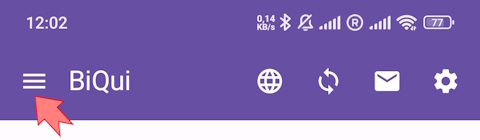
BiQui is currently available in German and English only. BiQui has three levels of difficulty. You can switch between them at any time via Menu > Account on the top left of the home screen.
- Beginner: Very easy and easy questions
- Advanced: Very easy to moderately difficult questions
- Expert: Easy to very hard questions
2. Starting a new game
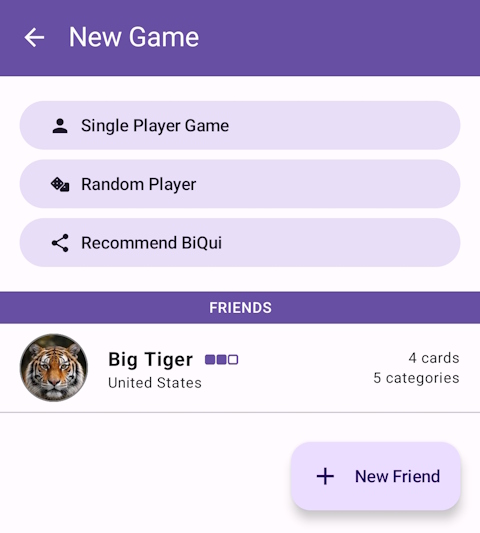
Click on New Game to start a game alone [Single-player Game] or with someone else:
- You can add a friend to your friends list and then start a game with them.
- You can start a game with a random player. The computer tries to match you with someone at a similar difficulty level. You will be notified as soon as a player is found, which may take some time.
To add someone to your friends list, you need to know their username. Ask your friends for their username and play with friends from your congregation or from other congregations.
3. Gameplay
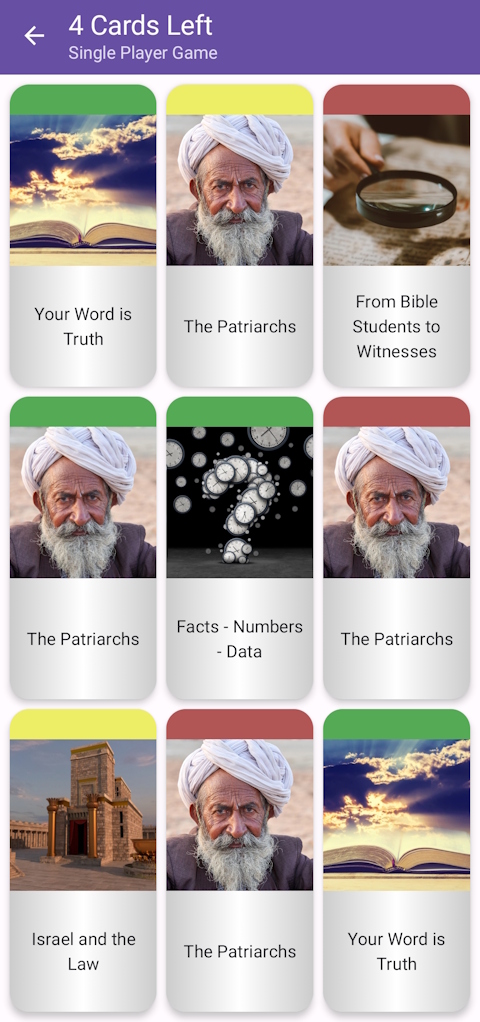
Each game has 3 rounds. In each round you see 9 question cards from different categories and with varying difficulty levels. In the beginning, you may play only 4 cards. Later you may play more.
 If you answer 3 questions in a row correctly, either horizontally or vertically, you will receive double points.
Click on a question card to open it. The app gives you 30–40 seconds to answer the question.

 For many questions, you can view the source after answering so you can explore the topic further.
A round ends after you have answered the number of questions available to you. You can start another round afterwards. After 3 rounds, the game ends and your points are added to your score.
BiQui has 11 categories (topics). Initially, you can play cards from 5 of them. As you progress, you unlock more categories.
The color of the question card indicates the difficulty level. The more difficult the card, the more points you will earn for a correct answer.
Beginner:
 very easy question [10 points]
 easy question [15 points]
Advanced:
- very easy question [10 points]
- easy question [15 points]
 moderately difficult question [20 points]
Expert:
- easy question [10 points]
- moderately difficult question [15 points]
 hard question [20 points]
 very hard question [25 points]
The blue question cards (very hard questions) are only shown after reaching a certain score, as described in point 5, and are not visible at the beginning.
 If you want to know more about the categories and difficulty levels available to you, please click on Menu > Personal Records at the top left of the home screen.
4. Special game features in multiplayer mode
In multiplayer mode, each player has 72 hours to complete a round. The score for each player will only be shown after both of you have finished the round. Since both players do not play at the same time, each player can continue whenever it suits them. It may therefore take some time until the other player has finished the round. Please be patient. You will be notified as soon as the other player continues.
If one of the players does not resume the game within the allotted timeframe, the game will be considered forfeited by that player.
You can also send a message from a list of predefined messages to the other player. We do not use an open chat in the app. The reasons for this are explained in the FAQs.
How many categories and cards can be played is also based on the other player. If you already play 9 categories and 5 cards per round, but your opponent only plays 7 categories and 4 cards per round, the game automatically uses the lower number of categories and cards. The same applies to the difficulty level. If one of the players selects a lower difficulty, the game will start with questions from that level.
5. Levels
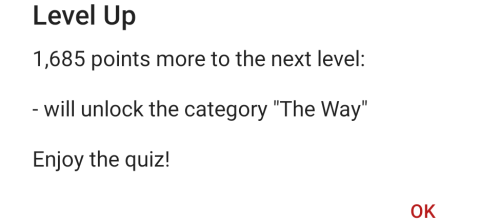
You start as “Beginner”. After your score reaches 3,000 points, you will advance to the next level, “Amateur”. The category “The Way” will be unlocked and you will receive a lifeline. We will not reveal more about the next levels here. Let yourself be surprised!
With each new level, you will receive one or more of the following:
- A new category will be unlocked.
- You may play one additional card per round.
- A new question type will be unlocked.
- For some categories, the very hard questions (blue) will be unlocked.
- You will receive one or more lifelines.
Tap your profile on the home screen to see how many points you still need for the next level and which new features will be unlocked.
6. Lifelines
 50:50 Lifeline: Two wrong answers disappear, leaving you with only two options to choose from.
 100% Lifeline: This guarantees the correct answer, but it can only be used after another lifeline has already been used.
 Ask the Audience Lifeline: The answers chosen by the last 10 players will be shown — but were they right?
 Stop the Clock Lifeline: The timer for your question will be stopped so that you have time to search for the correct answer.
There are different ways to receive lifelines:
- When adding your profile picture, you receive a lifeline.
- When you reach a new level, you receive one or more lifelines.
- For every 5 games completed with a random player, you receive a lifeline.
- If you send a referral link via New Game > Recommend BiQui and the other player enters your username in the “Referred by” field when creating a new game account, you will both receive several lifelines.
- For each question submitted and accepted, you receive a lifeline.
- If you work as a translator, you receive a lifeline for each translated question.
7. Gaming strategy
When playing with a friend or a random player, both of you see the same 9 question cards, no matter which language you are playing in.
Choosing your question cards wisely is part of the strategy. Sometimes you can receive more points by answering a row of easier questions correctly and doubling your score. You can also choose categories that suit you better. Nevertheless, you should always try to answer a full row of questions.
If your score is similar to the other player's score after two rounds, using a lifeline may help you find the correct answer and win the game.
8. Write questions
BiQui depends on up-to-date questions. New questions are added weekly, but before they enter the game, they are reviewed by us.
Who writes all these questions? You, the players of BiQui! Thank you very much!
Would you like to submit a question too? This becomes possible once you reach 15,000 points. In the meantime, you can learn which questions already exist in BiQui and what a suitable question for BiQui should look like. If your question is accepted, you will receive a lifeline.
We can only include well-researched, correctly written questions with clear and up-to-date sources. Referring only to a Bible verse is often not sufficient.
9. Errors in questions
If you notice a content or spelling mistake in a question, you can report it by tapping the bug icon on the question card.
Before reporting a content error, please study the topic again and review any sources given, if available. You should also provide an additional source explaining why you think the question is incorrect.
Questions reported as faulty are immediately removed from active play. After the facts have been reviewed by one of the editors, the question will either be corrected, deleted, or returned to the game unchanged.

10. Your attitude while playing
Please stay balanced while playing. BiQui is and remains a game — it is not about competition. It should also not replace your personal study.
Please do not be discouraged if you cannot answer many questions yet. Rather see it as an opportunity to discover something new and to learn more.
You may notice that the other player has chosen different question cards than you. That is part of the strategic element in BiQui and helps avoid an unhealthy competitive spirit.
11. Support BiQui
Thank you very much for supporting the development of BiQui. Several options are presented here.
12. Questions?
Please visit the FAQ page.